How can congestion feedback protect short requests from large transfers?
Equation-level smoothing and once-per-round marked-event reduction for a prescribed fraction sequence; additive increase and the network feedback loop are intentionally outside this component.
This notebook runs the complete saved experiment, checks its assertions, and regenerates the SVG from the computed results. Python 3.10+ and standard-library modules only. Place experiment.py and figure_generation.py beside the notebook. The exact loaded assets are recorded in notebook metadata.
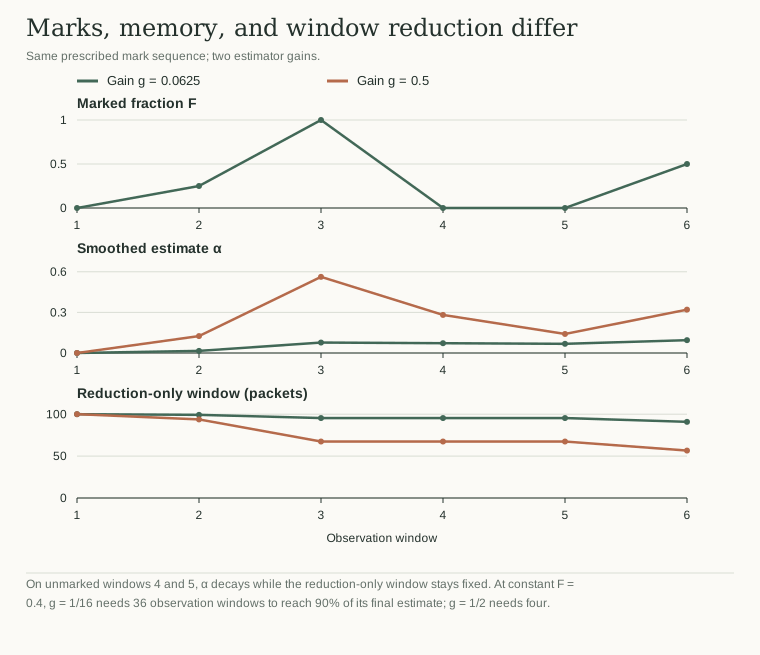
gain=0.0625
  round=1 F=0.00 alpha=0.000000 cwnd=100.000
  round=2 F=0.25 alpha=0.015625 cwnd=99.219
  round=3 F=1.00 alpha=0.077148 cwnd=95.391
  round=4 F=0.00 alpha=0.072327 cwnd=95.391
  round=5 F=0.00 alpha=0.067806 cwnd=95.391
  round=6 F=0.50 alpha=0.094818 cwnd=90.869
gain=0.5000
  round=1 F=0.00 alpha=0.000000 cwnd=100.000
  round=2 F=0.25 alpha=0.125000 cwnd=93.750
  round=3 F=1.00 alpha=0.562500 cwnd=67.383
  round=4 F=0.00 alpha=0.281250 cwnd=67.383
  round=5 F=0.00 alpha=0.140625 cwnd=67.383
  round=6 F=0.50 alpha=0.320312 cwnd=56.591
Constant-fraction recurrence check: passed, alpha=0.400000
gain=0.015625: 90% step response in 147 observation windows; half-life=44.014 windows
gain=0.062500: 90% step response in 36 observation windows; half-life=10.740 windows
gain=0.250000: 90% step response in 9 observation windows; half-life=2.409 windows
gain=0.500000: 90% step response in 4 observation windows; half-life=1.000 windows
Regenerated figure.svg from results.json.
Inspect the saved result
The article's static figure is available before running code. The regenerated figure.svg uses results.json, and every plotted quantity comes from the experiment.
Change an input in experiment.py, rerun both code cells, then compare the saved result and figure.
Python runs locally in this page. Saved results and figures are visible before execution.